Skip to content
Private OpenClaw AI Agent Appliance

Ayonix AIBOX — Your Private AI Agent Appliance

Run OpenClaw in your own environment. Message your AI assistant from WhatsApp, Telegram, Slack or Teams and let it handle business workflows, emails, reminders, research, scheduling and automation — without complex setup.
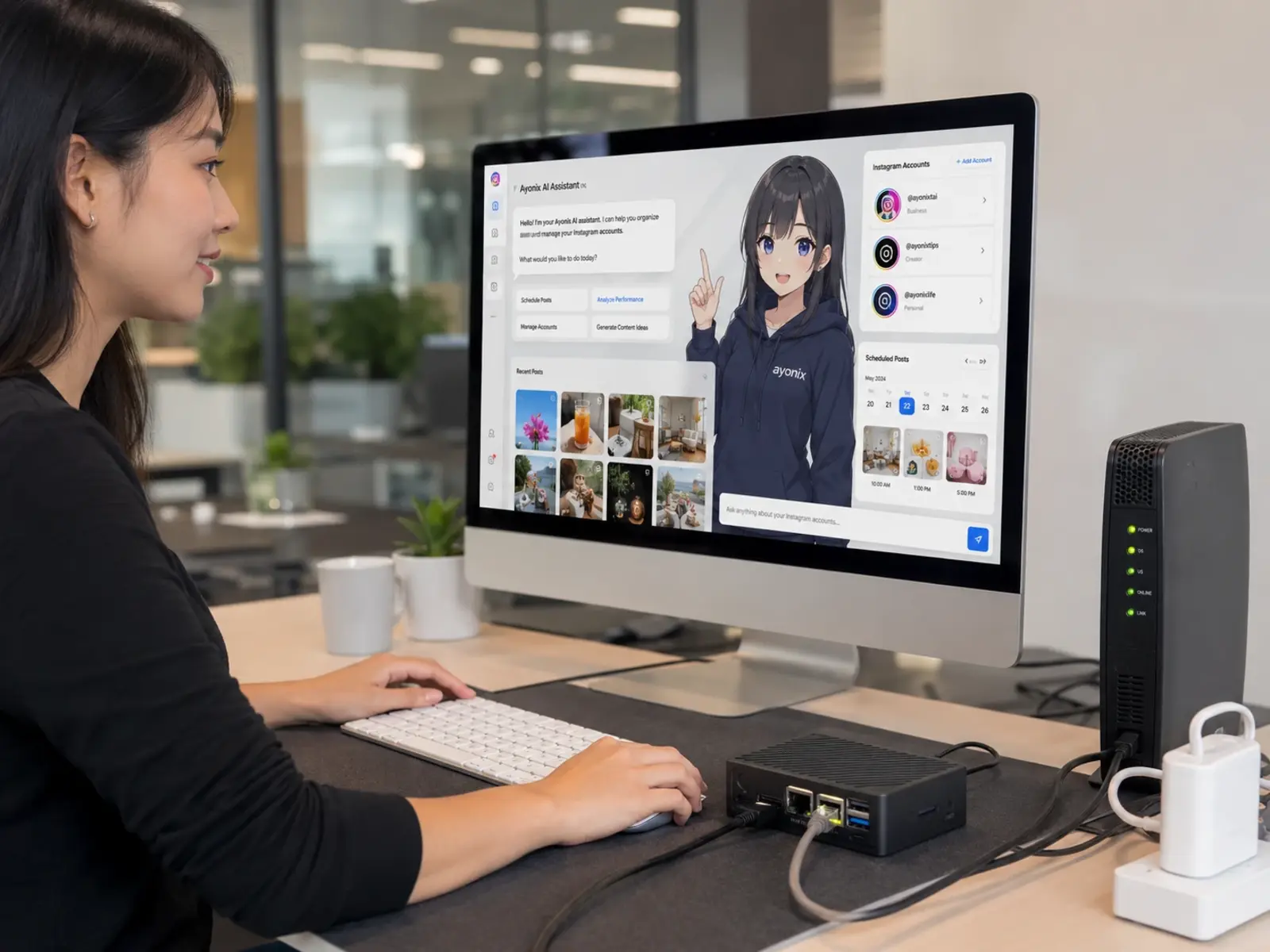
Message it fromWhatsAppTelegramSlackMicrosoft TeamsDiscord+ more
AYONIXAIBOX
Ayonix AIBOX · OpenClaw preinstalled · plug-in appliance
WhatsAppTelegramSlackTeams
OpenClaw-ready
Preinstalled & preconfigured
Self-hosted control
Runs in your environment
Multi-channel
WhatsApp · Telegram · Slack · Teams
Business automation
Email · calendar · workflows
Local appliance
Plug-in hardware deployment
Support included
Onboarding · updates · backup
The problem

AI agents are powerful. Setup, privacy, and maintenance are the problem.

Open-source AI agents are remarkable — and genuinely technical. Businesses need reliability, security, support and fast onboarding, not a weekend of DevOps. Most teams don't want to manage Node versions, gateways, channels, API keys, services, updates, logs, tunnels, backups or security by hand.

Complex setup

Node versions, gateways, tunnels, service managers, API keys — a working agent stack takes real engineering time before it does anything useful.

Cloud privacy concerns

Routing business conversations and documents through someone else's SaaS means giving up control over where your data lives and who can see it.

No always-on reliability

A laptop that sleeps or a container that crashes at 2am isn't an assistant. Business automation needs to stay up around the clock.

Hard channel configuration

Connecting WhatsApp, Telegram, Slack and Teams each has its own tokens, webhooks and quirks. Wiring them correctly is fiddly and easy to break.

No business support

Open-source issues and community forums are great — but they don't onboard your team, meet an SLA, or pick up the phone when something breaks.

No local dashboard

Without visibility into agent status, tasks, approvals and usage, an autonomous assistant becomes a black box you can't trust or govern.

Ayonix AIBOX makes OpenClaw appliance-ready — the power of open-source agents, delivered as a supported product.

The solution

AIBOX turns OpenClaw into a business-ready AI appliance.

Plug it in, connect your network, add your API keys, link your chat channels, and start messaging your assistant. Monitor everything from a dashboard — with Ayonix support behind you.

  1. 01

    Connect AIBOX

    Unbox, plug into power and your network. OpenClaw is already installed and hardened — no terminal required.

  2. 02

    Configure secure access

    We set up encrypted remote access and your admin dashboard so only your team can reach the appliance.

  3. 03

    Link messaging channels

    Connect WhatsApp, Telegram, Slack or Teams. Message your assistant from the apps your team already uses.

  4. 04

    Assign business tasks

    Point the assistant at email, calendar, files and tools. Give it real work: follow-ups, research, drafting, scheduling.

  5. 05

    Monitor, approve & automate

    Watch activity from the dashboard, approve sensitive actions, and let recurring workflows run on their own.

What the AI agent does

What does the AI Agent do?

OpenClaw is a persistent AI assistant. It receives messages from your existing chat apps, routes them to AI agents, executes workflows, remembers context, works with your tools and returns useful results. With Ayonix AIBOX, all of this runs from a dedicated appliance under your control.

Message in. Work done.

Chat with your assistant like a colleague from any of these channels:

WhatsAppTelegramSlackMicrosoft TeamsDiscordSignaliMessageGoogle Chat
Read the OpenClaw docs
Email handling
Triage, draft and summarize email threads.
Calendar scheduling
Book, move and confirm meetings from chat.
Task management
Create, track and chase tasks to completion.
Research
Search, compare and summarize into briefings.
Document drafting
Proposals, notes, replies and reports.
Web automation
Fill forms and run multi-step web tasks.
Coding-agent workflows
Run dev tasks, tickets and log summaries.
CRM updates
Log activity and update records from chat.
Knowledge assistant
Answer from your internal documents.
Smart reminders
Time- and context-aware nudges.
Top 10 use cases

Top 10 ways businesses use Ayonix AIBOX

One appliance, many jobs. Assign the assistant the roles your team needs most — each one runs from chat, with approvals and logging throughout.

01

Executive AI Assistant

Handles reminders, calendar requests, email drafts, meeting notes and daily priorities through chat.

02

Sales Assistant

Researches leads, drafts outreach, summarizes replies, prepares follow-ups and updates CRM workflows.

03

Customer Support Assistant

Answers internal questions, drafts support responses, escalates complex cases and summarizes conversations.

04

Operations Automation

Tracks repetitive tasks, creates checklists, sends reminders and coordinates routine workflows.

05

Research Assistant

Searches, summarizes, compares vendors, prepares briefings and creates structured reports.

06

Legal / Compliance Helper

Summarizes documents, tracks obligations, drafts internal notes and prepares review checklists.

07

HR / Admin Assistant

Drafts job descriptions, schedules interviews, answers policy questions and prepares onboarding material.

08

Finance / Procurement Assistant

Compares quotations, drafts purchase requests, tracks invoices and prepares approval summaries.

09

Developer / IT Assistant

Runs coding-agent workflows, summarizes logs, drafts tickets, helps with deployments and monitors technical tasks.

10

Personal Productivity Assistant

Manages reminders, travel tasks, notes, recurring actions and daily planning from messaging apps.

Give your team a 24/7 AI assistant this week.

Plug in AIBOX, connect your channels, and start automating from the apps you already use.

The hardware

Dedicated hardware. Private AI workflows. No complicated deployment.

A silent, compact appliance engineered to run your AI assistant around the clock. Pick the model that fits your team — from a single founder to a full enterprise department.
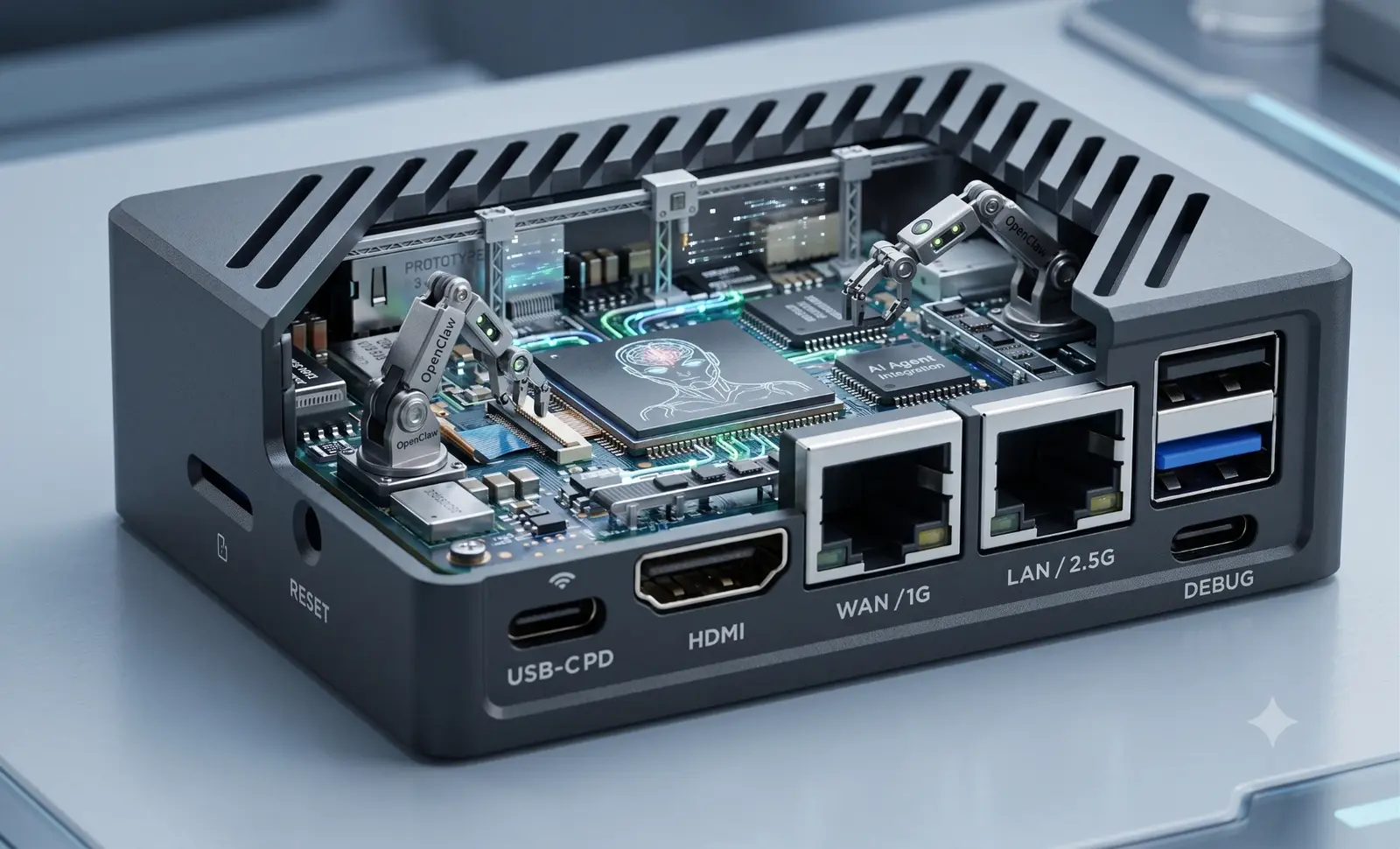
AYONIXAIBOX
Ayonix AIBOX · front I/O
Connectivity & I/O
USB-C PDHDMIWAN / 1GLAN / 2.5G2× USB 3.0USB-C DEBUG

Wired 1G WAN + 2.5G LAN for reliable always-on operation, HDMI for local setup, and a dedicated debug port for serviceability.

Ayonix AIBOX Starter

A compact, silent appliance for a single power user.

  • ARM processor
  • 8GB RAM
  • 32GB SSD
  • OpenClaw preinstalled
  • Remote setup support
  • Secure local access
Ideal for: Solo founders and small teams
Most popular

Ayonix AIBOX Pro

More headroom for multi-user teams and heavier workflows.

  • Higher RAM / storage option
  • Multi-user / team setup
  • Extended support
  • Backup / restore
  • Monitoring dashboard
  • OpenClaw preconfigured
Ideal for: Small & mid-sized businesses

Ayonix AIBOX Enterprise

Custom-specified hardware for regulated and larger teams.

  • Custom hardware
  • Private deployment
  • SSO / access policy options
  • Dedicated onboarding
  • SLA support
  • Enterprise integration
Ideal for: Enterprise departments & agencies
Architecture

One secure local control point

AIBOX sits between your chat channels, your AI models and your business tools — so intelligence flows through hardware you own, with approvals and logging at every step.

Channels
User messaging apps
WhatsAppTelegramSlackTeamsDiscord
Control point
Ayonix AIBOX Gateway
Secure local entryRoutingAccess control
Engine
OpenClaw Runtime
AgentsMemory / contextMulti-step execution
Intelligence
AI Model Provider
ClaudeOpenAIGeminiLocal model option
Actions
Business Tools
EmailCalendarCRMFilesBrowserInternal systems
Governance
Approval · Logs · Dashboard
Approval gatesAudit trailMonitoring

AIBOX acts as the secure local control point between chat channels, AI models, and business tools.

Product preview

See everything your assistant is doing

A local appliance dashboard gives you agent status, connected channels, active workflows, approvals, API usage, system health and audit logs — at a glance. Illustrative preview.

aibox.local · Control Dashboard Agent online
Agent status
Active
Uptime 14d 6h
Connected channels
  • WhatsApp
  • Telegram
  • Slack
  • Teams
API usage
128k
tokens today
System health
  • CPU 31%
  • Memory 2.1 / 8 GB
  • Temp 46°C
Active workflows
  • Daily priorities digestRunning
  • Lead follow-up chaserRunning
  • Invoice trackerScheduled
Recent tasks
  • Drafted reply to Meridian RFP2m
  • Booked demo — Thursday 3pm18m
  • Summarized 6 support threads41m
  • Updated CRM: 4 records1h
Approvals waiting
2Action needed

Send contract · Book flight

Backup status
Healthy

Last backup 3h ago

Restore point ready

Security alerts
All clear

No anomalies · 0 blocked

Logs / events
  • 12:04 task.completed
  • 11:58 approval.granted
  • 11:51 channel.msg wa
Security & privacy

Designed for businesses that care about data control.

AIBOX keeps your assistant, your keys and your conversations on hardware you own — with approvals, logging and update management built into how it's delivered.

Runs under your control

The appliance lives on your premises or your private network — not a shared multi-tenant cloud.

Local appliance deployment

Conversations and workflows are processed on hardware you physically own and can unplug.

Keys stay in your environment

Your AI provider API keys are stored on the box, not shipped to a third-party middleman.

Approval gates

Sensitive actions can require a human tap-to-approve before the agent executes them.

Logs & audit trail

Every task and action is recorded so you can review exactly what the assistant did.

Role-based access ready

Structured for per-user roles and permissions as your team grows.

Backup & recovery

Configuration and workflows can be backed up and restored if hardware is replaced.

Managed updates

Ayonix helps you apply OpenClaw and security updates without breaking your setup.

Network-isolation friendly

Deploy behind your firewall or on a segmented VLAN — no inbound cloud dependency required.

Security posture depends on your deployment and configuration. AIBOX provides the controls; compliance certifications are not implied unless explicitly stated in a signed agreement.

Comparison

Why Ayonix AIBOX instead of DIY OpenClaw setup?

DIY is powerful but technical. Cloud assistants are convenient but less controlled. AIBOX gives a practical balance: private, packaged, supported and ready to use.

CapabilityDIY OpenClawGeneric cloud assistantAyonix AIBOX
Setup timeHours–days of configInstant signupPlug in & onboard
Privacy controlFull, if you self-hostData in vendor cloudRuns in your environment
Hardware includedBring your ownNoneDedicated appliance
Business supportCommunity onlyTiered supportAyonix onboarding + SLA option
Always-on operationDepends on your opsVendor uptimeDedicated 24/7 box
Channel setupManual tokens & webhooksLimited channelsConfigured for you
UpdatesYou maintain itAuto (vendor)Assisted updates
MonitoringRoll your ownVendor dashboardLocal appliance dashboard
BackupManualVendor-managedBackup & restore
Enterprise readinessNeeds engineeringLimited controlCustom deployment + SLA
Pricing

Simple pricing for private AI automation.

Own the hardware, own your data. One-time appliance pricing with support and onboarding included — no per-seat lock-in.

AIBOX Starter

$499one-time

Best for: Individuals, founders, consultants

  • AIBOX hardware appliance
  • OpenClaw preinstalled
  • Basic setup guide
  • WhatsApp or Telegram setup support
  • 30 days basic support
Order Starter
Most popular

AIBOX Business

$999one-time

Best for: Small teams and professional offices

  • Higher-performance AIBOX
  • OpenClaw preconfigured
  • Multi-channel setup
  • Email / calendar workflow configuration
  • Remote onboarding session
  • 12 months software update assistance
  • Priority support
Buy Business

AIBOX Enterprise

Customquote

Best for: Companies, agencies, hotels, clinics, security firms

  • Custom hardware
  • Private deployment
  • Advanced channel & workflow setup
  • Security hardening
  • Team onboarding
  • Integration support
  • SLA option
Request Enterprise Quote

AI model usage costs are billed separately by the AI provider you choose (e.g. Anthropic, OpenAI, Google). OpenClaw itself is open-source; Ayonix AIBOX pricing covers appliance hardware, packaging, configuration, support, and business enablement.

Return on investment

Replace repetitive admin work with always-on AI execution.

Every hour the assistant handles is an hour your team spends on higher-value work. AIBOX centralizes that automation on hardware you control.

Save admin hours

Offload repetitive drafting, scheduling and follow-ups to an assistant that never clocks out.

Hours back / week

Reduce missed follow-ups

Automated reminders and chased tasks mean fewer leads and obligations slipping through.

Fewer dropped balls

Faster sales response

Draft outreach and reply summaries in seconds so your team responds while intent is hot.

Minutes, not hours

Centralize AI workflows

One controlled box for the whole team instead of scattered personal AI accounts.

1 governed hub

Avoid custom engineering

Skip the build-it-yourself agent stack and the maintenance burden that comes with it.

No dev project

Keep data under control

Automate without exporting sensitive business data to an opaque third-party cloud.

Your environment

Book a 20-minute AIBOX demo.

Book your demo
Who it's for

Built for the teams that run on follow-through

AIBOX fits wherever repetitive knowledge work slows a team down. A few of the roles it steps into from day one:

Ideal for founders

A chief-of-staff in a box that handles the admin so you can build.

Ideal for business owners

Automate operations and follow-ups without hiring for them.

Ideal for support teams

Draft responses, summarize threads and escalate the hard ones.

Ideal for sales teams

Research leads, prep outreach and keep the CRM current.

Ideal for technical teams

Run coding-agent workflows, triage logs and draft tickets.

OpenClaw is an independent open-source project with an active community. Learn more at openclaw.ai .

FAQ

Questions, answered

Everything you need to know about AIBOX, OpenClaw, privacy, support and pricing.

What is Ayonix AIBOX?
Ayonix AIBOX is a private AI agent appliance — a small, dedicated piece of hardware that runs OpenClaw out of the box. It gives your business a 24/7 AI assistant you can message from your existing chat apps, without complex installation or a cloud dependency.
What is OpenClaw?
OpenClaw is a self-hosted AI assistant and gateway. It lets you talk to AI agents through familiar messaging channels like WhatsApp, Telegram, Slack and Teams, and can handle emails, calendars, reminders, research, web tasks, coding-agent workflows and multi-step automation — while you keep control of your environment and data.
Is OpenClaw included?
Yes. OpenClaw comes preinstalled and preconfigured on every AIBOX. OpenClaw is an independent open-source project; Ayonix packages, configures and supports it as a ready-to-use appliance.
Do I need coding knowledge?
No. The whole point of AIBOX is that you skip the technical setup. You plug it in, we help connect your channels and workflows, and you interact with the assistant by messaging it like a colleague.
Does it work with WhatsApp and Telegram?
Yes. WhatsApp and Telegram are core supported channels. You message your assistant from the same app you already use every day.
Can it work with Slack or Microsoft Teams?
Yes. Slack and Microsoft Teams are supported, along with Discord and other channels — ideal for internal team assistants and shared workflows.
Is my data private?
AIBOX is designed for data control. It runs in your own environment on hardware you own, your AI provider keys stay on the box, sensitive actions can require approval, and everything is logged for audit. It is not a shared multi-tenant cloud service.
Do I need an OpenAI or Claude API key?
Yes. AIBOX runs the assistant locally, but the underlying intelligence comes from an AI model provider such as Anthropic (Claude), OpenAI or Google. You bring your own API key, which stays on your appliance. A local-model option is available for advanced deployments.
Are AI usage costs included?
No. AI model usage is billed separately by whichever provider you choose. AIBOX pricing covers the hardware, OpenClaw packaging, configuration, support and business onboarding — not the per-token model costs.
Can Ayonix configure it for my company?
Yes. Business and Enterprise plans include remote onboarding where we connect your channels, set up email/calendar workflows and tailor the assistant to how your team actually works.
Can it run 24/7?
Yes. AIBOX is a dedicated always-on appliance, so your assistant stays available around the clock — unlike a laptop that sleeps or a container you have to babysit.
What happens if I need support?
Every plan includes support, from basic setup help on Starter to priority support and an SLA option on Business and Enterprise. We also assist with OpenClaw and security updates so your setup keeps working.
Can it be customized?
Yes. Enterprise deployments include custom hardware, advanced workflow and channel setup, security hardening and integration with your internal systems. Workflows and connected tools are configurable on every tier.
Can I use it for sales, support, or executive assistant workflows?
Absolutely — those are among the most popular uses. The same appliance can act as an executive assistant, a sales research and outreach helper, and an internal support assistant, with approvals and logging throughout.

Ready to see AIBOX in action?

Book a 20-minute demo and we'll tailor it to your workflows.

Contact

Request an AIBOX demo

Tell us a little about your team and how you'd like to use AIBOX. We'll tailor the demo to your workflows.

Preferred channels

We'll only use your details to respond to this request.